
Security Analysis of LastPass credential leak — By bypassing do_popupregister()
This blogpost is about a recently disclosed security issue with the LastPass browser extension discovered by Tavis Ormandy from the Google Project Zero Team. This post describes the technical details about the issue, what attackers can do with this and if you, as a user, should be concerned about this issue or not.

Background
On Sept 16th, Tavis Ormandy from the Google Project Zero team tweeted the following
https://twitter.com/taviso/status/1173401754257375232
The bug report is at https://bugs.chromium.org/p/project-zero/issues/detail?id=1930 which details the bug in LastPass’ browser extension that could leak the last used credentials due to an internal cache not being updated when the tab changes.
Technical Inspection
When a domain that is saved in LastPass is browsed with the extension enabled, LastPass is able to create a popup when the “…” icon is clicked prefilled with the credentials belonging to that domain.
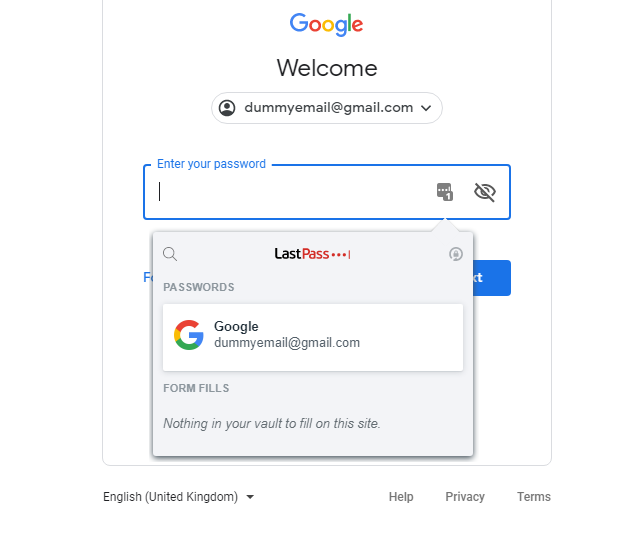
LastPass prompting to enter saved credentials
This is achieved by calling the do_popupregister() function in popupfilltab_bg.js (line 378, prettified). The full URL of the browser tab in which LastPass was used to fill the password is stored in a variable called g_popup_url_by_tabid.
The problem, as per the bug report, arises when the popupfilltab.html from LastPass is loaded in an iframe via the handler to view extension pages (i.e via moz-extension, ms-browser-extension, chrome-extension, etc) as a web resource. As the popup page is loaded in an iframe, the function frame_and_topdoc_has_same_domain() from LastPass’ background.js (line 7801, prettified) is called to verify if the top domain and the iframe share the same origin. This function calls ftd_get_frameparenturl() (line 7811, prettified) which uses the cached value in g_popup_url_by_tabid since the popup page was loaded directly as an iframe and not via a call to do_popupregister().
To reproduce this issue, you can use the steps given in the bug report or use the following simplified steps to see the bug in action
- Verify if you have LastPass less than 4.33.0 installed. The screenshots below are for LastPass version 4.32.0. You can do this by clicking on the LastPass icon > More Options > About LastPass. The extension id is hkbmeeengepdopgafeafeddkhnceohhp
- Browse to https://accounts.google.com and click on the ”…” icon
- Instead of filling in the credentials, in the same tab go to https://x41.co/lastpassdemo.html. This page uses the same JavaScript that Tavis used to create an iframe in the document.
- Notice your credentials in this window
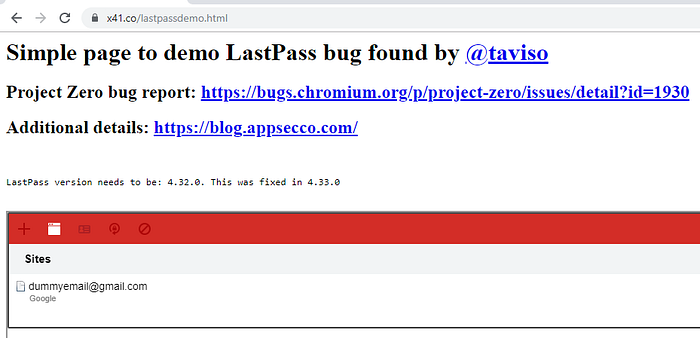
Credentials from previous page in an iframe on attacker site
Additionally, the bug report also mentions how with this PoC the credentials cannot be stolen via clickjacking or by tricking a user into copying the credentials as a prompt such as below would be shown.
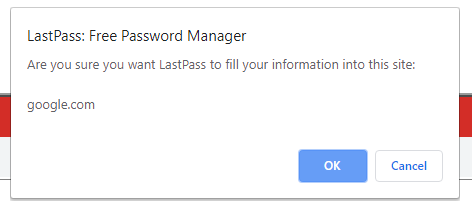
Alert message when the credential entry is clicked from within the iframe
This is because of the function frame_and_topdoc_has_same_domain() returns false in background.js (line 7801, prettified) as the value of compare_tlds(lp_gettld_url(a), lp_gettld_url(t)) is false in that function. Furthermore, it is possible to bypass the prompt and perform a successful clickjacking attack without the prompt by using a site that allows to iframe an untrusted page like https://translate.google.com/translate?sl=auto&tl=en&u=https://x41.co/lastpassdemo.html
Get Riyaz Walikar’s stories in your inbox
Join Medium for free to get updates from this writer.
However, it is also possible that a user may simply choose to disable the alert messages as Chrome provides an option to disable JavaScript alert boxes as a feature to avoid being spammed by sites.
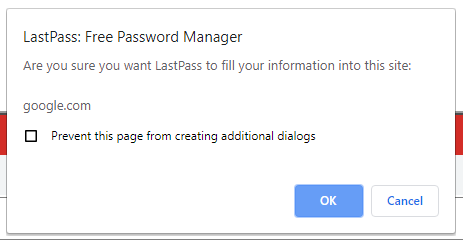
Chrome being nice by showing an option to disable page alerts
Should I be worried?
Short answer, not really. Long answer, maybe if you are not careful about your browsing habits and if you have not updated the LastPass extension to the fixed 4.33.0 version.
To be attacked, a user would have to meet the following conditions/perform the following actions
- Have the vulnerable version of the LastPass extension installed
- Be logged into LastPass
- Must have clicked on the 3 “…” icon on a domain whose credentials are present in LastPass
- Must click on another link that the attacker has shared with the user
- Must perform an additional activity like mouse click + mouse Click on OK on an alert prompt/press Enter OR
- Must perform an additional activity like two Clicks in two different locations on the page and then press Ctrl+V (Paste)
The last two steps mimic the actions you would take (6) to fill a form with the credentials and (7) click on the spanner icon and then select Copy Password and then paste it in an attacker controlled input field.
Moreover, this issue has been fixed before the bug was made public and the proof of concept code was released. Restart your browsers for the new version of the extension to be installed automatically.
Closing thoughts
Although a very interesting security vulnerability in itself, the likeliness of this being exploited in the wild is very minimal owing to the complexity of the attack and the fact that an update for the extension was released almost a week before the bug and PoC was made public.
Regardless of the security issue in discussion here, it is always a good idea to practice basic security hygiene like not having simple passwords, not reusing passwords across different sites and using a different browser or Private/Incognito mode when browsing to websites you do not trust.
At Appsecco we provide advice, testing, training and insight around software and website security, especially anything that’s online, and its associated hosting infrastructure — Websites, e-commerce sites, online platforms, mobile technology, web-based services etc.